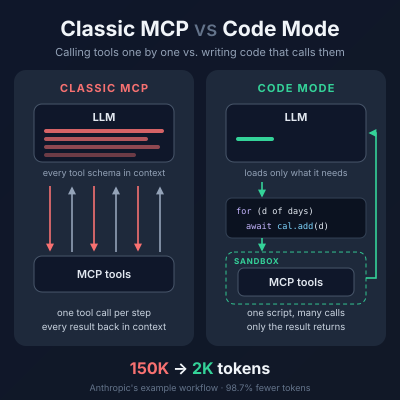
Code Mode MCP keeps the same MCP servers but changes how an agent uses them: instead of calling tools one by one, the model writes a small program that calls the tools, and that program runs in a sandbox. The payoff is far fewer tokens on tool-heavy tasks — Anthropic reported one workflow dropping from about 150,000 to 2,000 tokens.
The name comes from Cloudflare, which called the pattern “Code Mode”; Anthropic published the same idea as “code execution with MCP”. Both start from one observation: LLMs are better at writing code than at making long chains of tool calls.
How classic MCP works
In the classic setup, the MCP client loads every tool’s name, description and JSON schema into the model’s context. The model then calls tools directly, one call per step.
- The client lists all tools from all connected servers and puts their definitions in the prompt.
- The model picks a tool and emits a call with arguments.
- The full result comes back into the context.
- The model reads it, decides the next call, and repeats.
This is simple and works well with a handful of tools. It breaks down at scale in two ways:
- Definition bloat. At roughly 150 tokens per tool, 1,000 tools cost about 150,000 tokens before the agent reads your request.
- Intermediate results. Every result passes through the model, even when it only needs to be handed to the next tool. A 50,000-token document fetched from one tool and copied into another is paid for twice.
How Code Mode works
Code Mode turns MCP servers into a code API. The model sees one or two generic tools instead of hundreds, and writes code against typed functions.
- The client converts each server’s tool schemas into typed functions (Cloudflare generates TypeScript signatures).
- The model discovers only the functions it needs — for example by searching or browsing a file tree — rather than loading them all up front.
- The model writes a script that calls those functions, with loops, filters and conditionals.
- The script runs in a sandbox. Only the final, filtered output returns to the model.
URL Pattern sample
https://<subdomain>.<domain>/mcp?codemode=search_and_executeA small example of the difference:
// Classic: 31 separate tool calls, each result read by the model
// Code Mode: one script
for (const day of daysInMonth) {
  await calendar.createEvent({ date: day, title: "Standup" });
}
Cloudflare’s own API server shows how far this goes: it exposes just two tools, search() and execute(), to cover more than 2,500 endpoints. Its MCP server portals now run in Code Mode by default, exposing a single code tool and keeping credentials out of the model’s context.
Side by side
| Aspect | Classic MCP | Code Mode MCP |
|---|---|---|
| What the model sees | Every tool’s full schema | One or two generic tools; functions loaded on demand |
| How it acts | One tool call per step | Writes a script that calls many tools |
| Intermediate data | Flows through the context window | Stays in the sandbox; only results return |
| Loops and filtering | Done by the model, call by call | Done in code (for, if, map, filter) |
| Token cost | Grows with tool count and data size | Roughly flat; large savings on batch tasks |
| Output tokens | Lower | Higher, since the model writes code |
| Infrastructure | Just client + server | Needs a secure sandbox with limits and monitoring |
| Debugging | Each call is visible and auditable | Must inspect generated code and its logs |
| Credentials | Passed via the client | Can be kept outside the model entirely |
Reported savings vary by task: Cloudflare measured 32% fewer tokens on a single event and 81% on a 31-event batch; one independent benchmark found 78.5% fewer input tokens but 2.2× more output tokens, for about 70% lower cost overall.
When to use which
Pick classic MCP for small toolsets and simple, few-step tasks; pick Code Mode once you have dozens of tools, large payloads, or repetitive batch work.
- Classic MCP: under ~20 tools, short interactions, environments where you cannot run untrusted code, or where every call must be individually approved.
- Code Mode: many servers or hundreds of endpoints, data that should be filtered before the model sees it, multi-step workflows, and teams that already run sandboxes.
Neither replaces MCP itself. Code Mode is a different way for the client to use the same servers, so you can adopt it without rewriting them.